
Download Paytradie – Free Accounting Software for Traders
Overview
Paytradie is an accounting software designed specifically for traders who need a fast, reliable, and affordable way to manage their finances on the go. The platform blends invoicing, quoting, and instant payment processing into a single, easy‑to‑use tool that works on handheld devices as well as desktop computers. What sets Paytradie apart is its ability to accept credit‑card payments without requiring a traditional merchant account, meaning you can receive funds directly into your bank in seconds.
The core accounting engine runs silently in the background, automatically reconciling transactions, updating ledgers, and generating reports. Whether you’re a day‑trader, a small‑scale wholesaler, or a freelance consultant, Paytradie offers a secure environment to track income, expenses, and cash flow without the overhead of expensive ERP solutions. The software is available for free, with optional premium subscriptions that unlock advanced analytics, multi‑currency support, and priority customer service.
A 90‑day money‑back guarantee gives new users confidence to explore the premium features risk‑free. In today’s fast‑paced market, Paytradie’s blend of flexibility, real‑time payment acceptance, and transparent pricing makes it a compelling choice for anyone looking to keep their business finances under control.
Key Features
- Instant Credit‑Card Payments: Accept payments on any device without a merchant account; funds are transferred to your bank instantly.
- Mobile Invoicing & Quoting: Create professional invoices and quotes from smartphones or tablets, then email or share them via QR code.
- Automatic Reconciliation: All transactions are logged and matched automatically, eliminating manual entry errors.
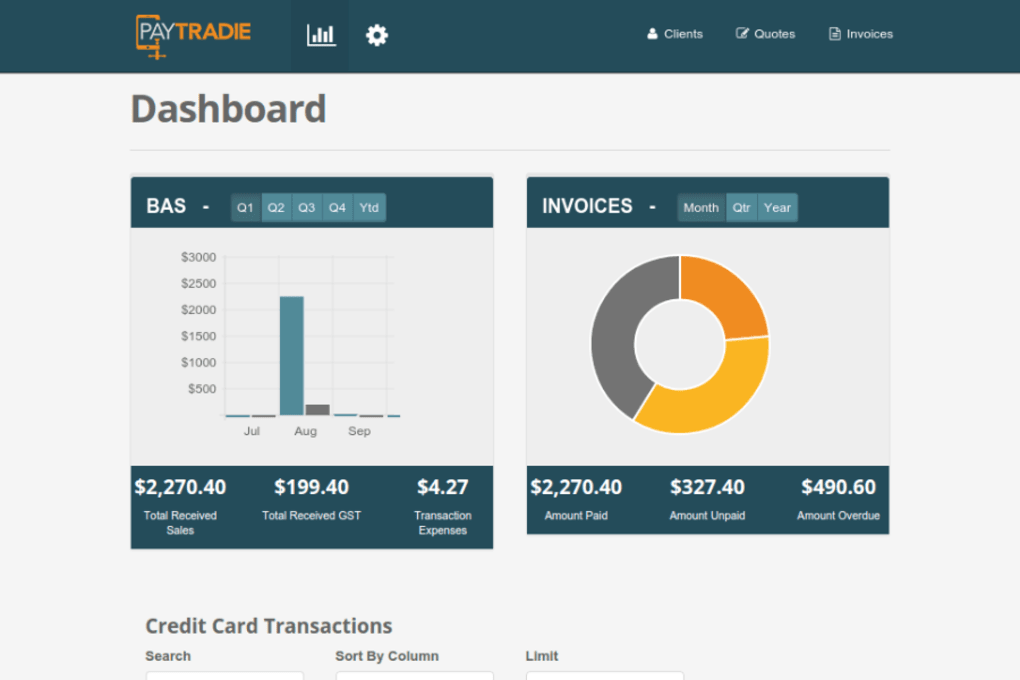
- Real‑Time Dashboard: View cash flow, outstanding invoices, and profit margins in a single, customizable screen.
- Multi‑Currency Support: Process payments in USD, EUR, GBP, and many other currencies, with automatic conversion rates.
- Secure Data Encryption: End‑to‑end SSL/TLS encryption safeguards sensitive financial data both in transit and at rest.
- Offline Mode: Create invoices and record expenses even without internet; data syncs automatically when you reconnect.
- Integrations: Connect with popular accounting platforms (QuickBooks, Xero) and e‑commerce solutions (Shopify, WooCommerce).
- Free Tier & Affordable Plans: The free version includes essential invoicing, while premium tiers add advanced reporting, API access, and dedicated support.
- 90‑Day Refund Policy: Try any premium plan risk‑free; if you’re not satisfied, request a full refund within 90 days.
Installation, Usage & Compatibility
Getting started with Paytradie is straightforward, whether you prefer a desktop environment or a mobile app. Follow these steps to download, install, and begin processing payments:
Step‑by‑Step Installation
- Visit the official Paytradie website and click the Download button that matches your operating system.
- For Windows users, run the
.exeinstaller and follow the on‑screen prompts. macOS users download the.dmgfile, drag the app to the Applications folder, and launch it. - Mobile users can find Paytradie in the Apple App Store or Google Play Store. Search “Paytradie Accounting” and tap Install.
- After installation, open the app and create a new account using your email address. A verification email will be sent—click the link to confirm.
- Complete the onboarding wizard: enter your business name, select your primary currency, and connect your bank account for direct deposits.
Once installed, the interface guides you through creating your first invoice. Choose a client from your address book or add a new one, select the products or services, set payment terms, and hit Send. Clients receive a secure link where they can pay instantly with any major credit card. All transaction details appear instantly on your dashboard, and the built‑in accounting module updates your ledger without any extra effort.
Compatibility: Paytradie runs on Windows 10/11, macOS 10.15+ (Catalina and later), iOS 13+ for iPhone and iPad, and Android 8.0+ (Oreo). The web version is also accessible via modern browsers like Chrome, Firefox, Safari, and Edge, ensuring you can manage finances from any device with an internet connection.
Pros, Cons, FAQ & Conclusion
Pros
- Free tier provides essential invoicing and payment processing.
- No merchant account required—instant payouts directly to your bank.
- Mobile‑first design lets traders work from anywhere.
- Automatic reconciliation reduces manual bookkeeping errors.
- Robust security with SSL/TLS encryption and compliance with PCI‑DSS.
Cons
- Advanced analytics are only available in premium plans.
- Limited custom branding options in the free version.
- Some users report a learning curve when integrating with third‑party accounting software.
Frequently Asked Questions
Is Paytradie really free to use?
Yes, Paytradie offers a free tier that includes unlimited invoicing, quoting, and instant credit‑card payments. Premium features are optional and come at affordable monthly or annual rates.
Do I need a merchant account to receive payments?
No. Paytradie processes credit‑card transactions on your behalf and deposits the funds directly into your linked bank account, eliminating the need for a separate merchant account.
Can I use Paytradie offline?
Yes. The app includes an offline mode that lets you create invoices and record expenses without internet access. All data syncs automatically once you reconnect.
What security measures protect my financial data?
Paytradie uses industry‑standard SSL/TLS encryption for data in transit and stores information on PCI‑DSS compliant servers. Two‑factor authentication (2FA) is also available for added account protection.
How does the 90‑day refund policy work?
If you subscribe to a premium plan and are not satisfied within the first 90 days, you can request a full refund through the app’s support portal. The process is straightforward and typically completed within 5–7 business days.
Conclusion & Call to Action
Paytradie delivers a compelling mix of free functionality, instant payment processing, and mobile flexibility that is hard to match in the crowded accounting software market. Traders who need to invoice on the fly, receive payments without the hassle of a merchant account, and keep their books automatically updated will find Paytradie both effective and affordable. The free tier is generous enough for startups, while the reasonably priced premium plans provide the depth needed for growing businesses.
With a 90‑day money‑back guarantee, you can explore the full feature set without risk. Ready to streamline your trading finances? Download Paytradie today and experience secure, real‑time accounting that moves as fast as your business.



.png)



